Configuring input sources
At a glance
- Three input sources: File (the default), Email, or HTTP.
- HTTP needs a connection method — the fields it asks for depend on which one you pick.
- For a "GET" connection, MorphMapper computes an authentication token from your username and password automatically — you won't see a separate field for it.
When creating or editing a template, you choose where its source document will actually come from. This is a different setting from the file you upload while testing — it's about how this template's file arrives in production once deployed.
The three input sources
| Source | Description |
|---|---|
| File | Default. A document is provided directly, the way you uploaded one during setup. |
| The document arrives as an email attachment. | |
| HTTP | MorphMapper (or the system running it) connects out to fetch the document itself. Choosing this reveals a connection method to configure. |
HTTP connection methods
Pick one of three connection methods, each asking for different credentials:
| Method | Fields required |
|---|---|
| POST | Username and password. |
| GET | Username and password, plus a token MorphMapper computes from them automatically. There's no separate field for the token; it's derived from what you enter. |
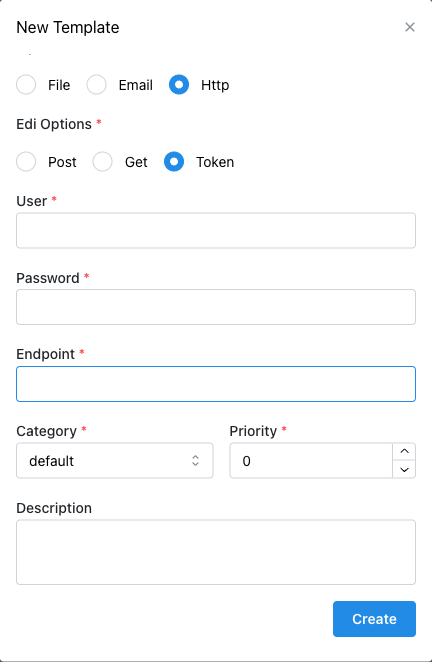
| Token-based | Username, password, and an endpoint address to connect to. |
Only the fields relevant to the selected method are shown; the form adjusts as you change your selection.

Token-based is the one method with an extra field — its User and Password sit alongside a third, Endpoint, for the address MorphMapper connects to.
Field types and schema variables
Each credential field is masked or plain depending on the connection method — not consistently across all three:
| Method | Fields | Password field's input type |
|---|---|---|
| POST | User, Password | Masked (password input) |
| GET | User, Password (+ derived token) | Masked (password input) |
| Token-based | User, Password, Endpoint | Plain text (not masked) |
Whatever you enter is passed into the template at runtime as a schema variable, which is what you'd reference from a Document Variable or Anchor Variable node if the template's logic needed to read back the connection's own credentials: User becomes $ediUser, Password becomes $ediPassword, and Token-based's Endpoint becomes $ediEndpoint.
For GET, the derived token that MorphMapper computes from User and Password (mentioned above) is exposed as $ediOAuth. The value itself is base64(user:password) — HTTP Basic auth's standard encoding — computed from whatever you typed into User and Password at the moment you saved the template, not recomputed at request time.